If you want to adjust the brightness, color, or other display settings, please enter the OSD Menu as shown below: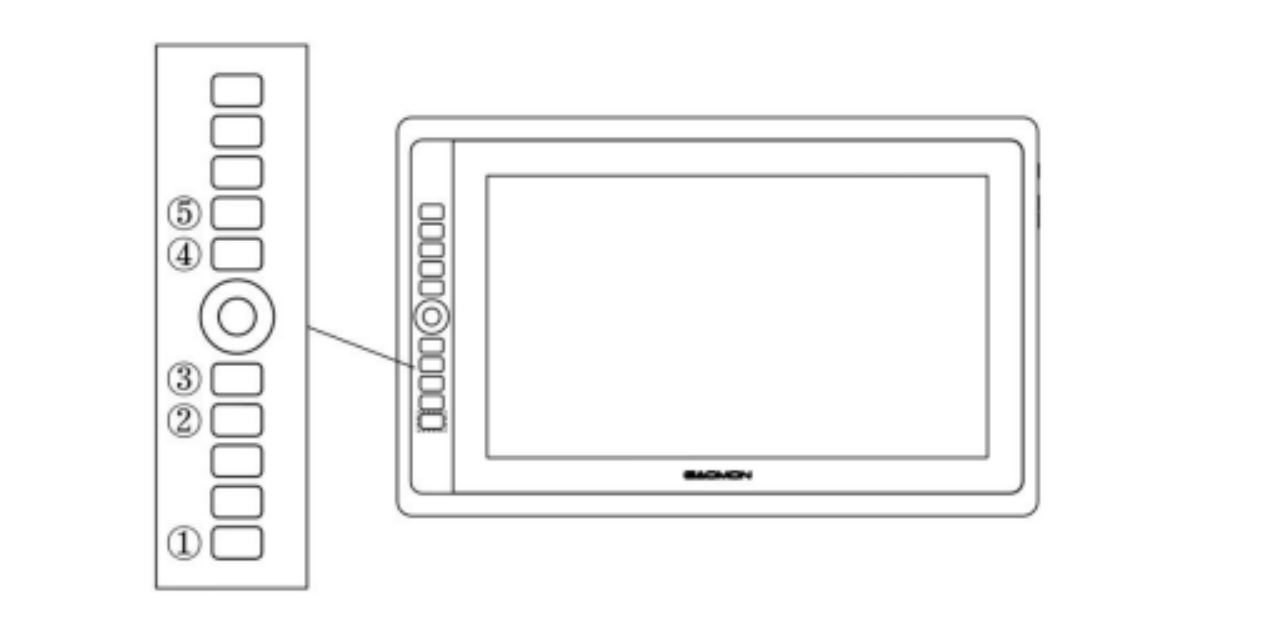
Enter OSD Menu:
- Press ① - “Function Button” for around 3 seconds until the OSD menu appears; meanwhile, the indicator will be on. The function of the Keys ②③④⑤ will become the OSD function.
- In the menu, the function of ②③④⑤ will become as follows:
- ② AUTO: Before entering the menu, its function is auto adjustment. After entering the menu, its function returns to the previous menu.
- ③ MENU: Press to call up the menu. After entering the menu, its function is to confirm.
- ④ -: After entering the menu, its function is down/left/decrease.
- ⑤ +: After entering the menu, its function is up/right/increase.
Exit OSD Menu:
- Press ① - “Function Button” again for around 3 seconds until the indicator turns off; the functions of Keys ②③④⑤ will become shortcut functions again.
Was this article helpful?
That’s Great!
Thank you for your feedback
Sorry! We couldn't be helpful
Thank you for your feedback
Feedback sent
We appreciate your effort and will try to fix the article